Free during the beta · For Mac
Mail that knows what needs you.
Give your inbox some margin.
A native Mac email app for Gmail, with your calendar and the people you work with in one window. MarginMail finds time in your day, keeps what matters and marks what needs you, privately.
You’re on the list.
We’ll email you when your invite is ready. Until then, that’s the only email you’ll get from us.
You’re already on the list.
Good news: nothing else to do. We’ll email you when your invite is ready.
That didn’t go through.
Check your email address and try again. If it keeps happening, write to hello@marginmail.ai.

What is MarginMail?
MarginMail is a native Mac email app for Gmail and Google Workspace, with a calendar and a personal CRM built in. It notes what needs you (follow-ups, meeting invites and requests), helps you find a meeting time as you type, and gives everyone you write to a page. Its AI is optional: Apple Intelligence on your Mac, or your own Claude when you click, never a MarginMail server, and it never sends email for you.
What the margin is for
The margin is where the work gets clear. Every good page of notes has one. It’s where you find time in a full day. Where you keep the facts worth remembering. Where you skim to see what was decided and what still needs you. Where you underline what matters, circle the ask, and make the call. MarginMail brings that to your mail. It finds the time, keeps your people close, marks what needs you, and turns a chaotic day into a short, ordered stack. Then it gets out of the way.
Find time
Type “Tuesday with Ava” and both calendars’ free times appear.
Find a time · Live words · Calendar built in
Keep what matters
Everyone you write to has a page: what you promised, what they’re waiting on, and the time where they are.
People pages · Companies · Notes
Skim, then know
See why something’s here, what’s been decided, and the exact sentence that asks.
“Why this?” · What’s been decided · Highlighted asks
Make the call
What needs you is a stack. Right for Done, left for Later, or reply.
The Margins stack · Done · Later · Write it
Bring order
A messy day becomes a short stack, and an empty one ends in a sunrise.
The Margins stack · All clear scenes
Mark what matters
MarginMail highlights the ask in the message and marks the row in the margin.
Highlighted ask · The margin mark
Follow-up reminders, requests and meeting invites
Only what needs you.
MarginMail writes a short note in the margin when someone's waiting on you, when you're waiting on a reply, or when a meeting invite needs an answer. Open the stack and work through them like cards: drag right for Done, left for Later.
MeetingNext week
Imogen asked for 30 minutes next week · Why this?
IH
Imogen HaleKiln & Co.
Fernhill kickoff
She wrote
“Could we find 30 minutes next week to kick things off with your team?”
Find a time ⏎Not useful
Follow-up6 days
You asked Ava on Oct 9, no reply in 6 days · Why this?
AL
Ava LindqvistSaltmarsh Coffee
Spring catalog shoot
You wrote
“Could you confirm the final shot list by Monday?”
Nudge Ava ⏎Not useful
NC
Nora Castilloto Ava Lindqvist · Oct 9
Spring catalog shoot
Hi Ava, thanks for the moodboard notes, they’re lovely.
Could you confirm the final shot list by Monday?
Lena can hold the studio on the 28th once we have it.
Nudge Ava ⏎Turn back O
RequestDue Thu
Marco asked for the signed proof by Thursday · Why this?
MR
Marco ReyesTidewater Print
Re: Revised quote, spring catalog
He wrote
“Could you send back the signed proof by Thursday? Then we can hold the press slot.”
Reply ⏎Not useful
Done
Follow-ups
You asked Ava on Oct 9. No reply in 6 days.
Meetings
Unanswered invite: Saltmarsh shoot walkthrough, Thursday.
Requests
Marco asked for the signed proof by Thursday.
Every card has a Why this? that shows exactly what MarginMail noticed. Cards flip over to show their email.
Email, calendar and contacts in one Mac window
Your mail, your calendar and your people, side by side.
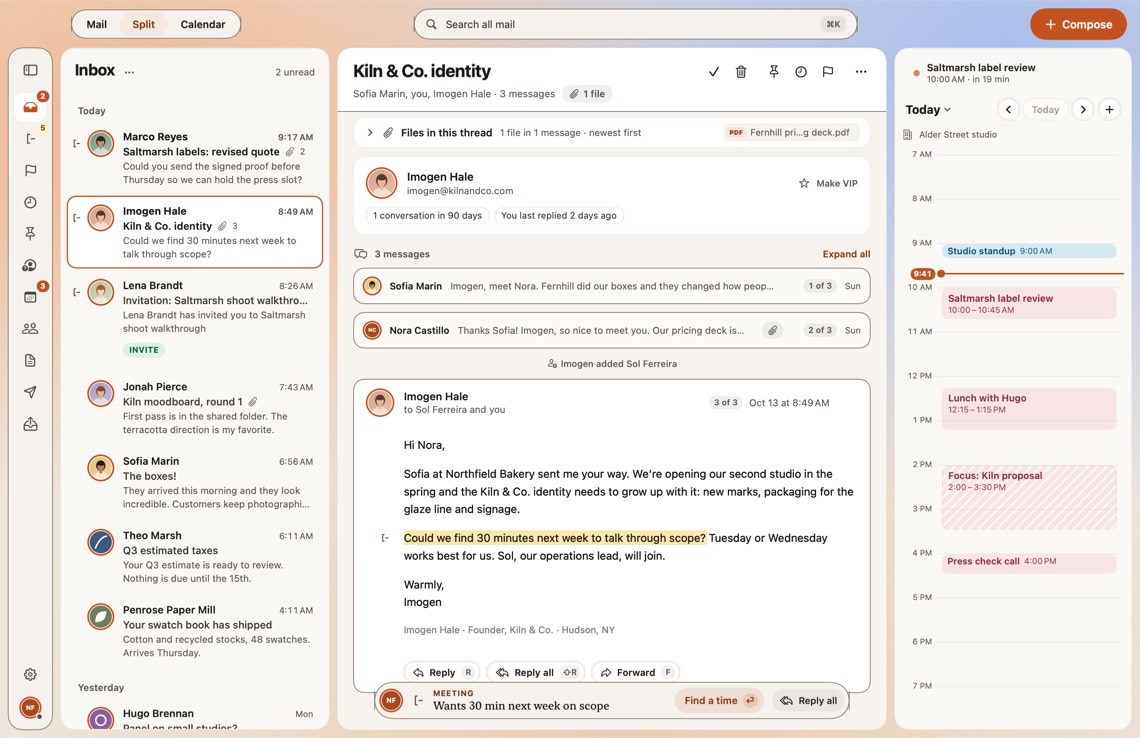
Open Split view and your whole day is in one window. Read Imogen’s message, and her page is a click away: what you last talked about and the time where she is. Today’s calendar sits beside it. An invite you haven’t answered looks different. Press A, M or D, and its email files itself. No tab to keep open, no app to switch to.
A private personal CRM, built from your Gmail and calendar
Everyone you write to has a page.
Before a meeting, open their page: what you last talked about, what you promised, who’s waiting on whom, and the time where they are. Tasks close themselves when the reply, the file or the yes arrives. Companies group themselves by email domain. It’s all built from the mail and calendar you already have, and it stays in your own Google account. Nothing to import. Nothing uploaded.

Google Calendar built in, with Find a time
Find time in the margins of your day.
The full calendar is one click away. Meeting invites you haven’t answered look different, and a Needs your answer list keeps them together, each answered with one key. Need to schedule a meeting? See both calendars side by side, pick a time, and the hold is placed for you.
9
10
11
12
1
2
3
4
12:00 – 1:00 · both free
9
10
11
12
1
2
3
4
12:00 – 1:00 · both free

Schedule meetings and attach files as you type
Type the plan. MarginMail does the rest.
As you write, dates, people, files and promises become actions. Type “Tuesday with Ava” and both calendars’ free times appear. Type “the pricing deck” and the file is attached. It’s all rules, so it’s instant, private and works with AI off.
To
ALAva Lindqvist
Subject
Re: Spring catalog shoot
Tuesday with Ava works, I’ll send the pricing deck by Friday
PDFPricing deck.pdf
Promise · deck by Fri, Oct 23
Live words · rules only, no AI
Send
Email summaries and highlighted asks
Skim it. Know what matters.
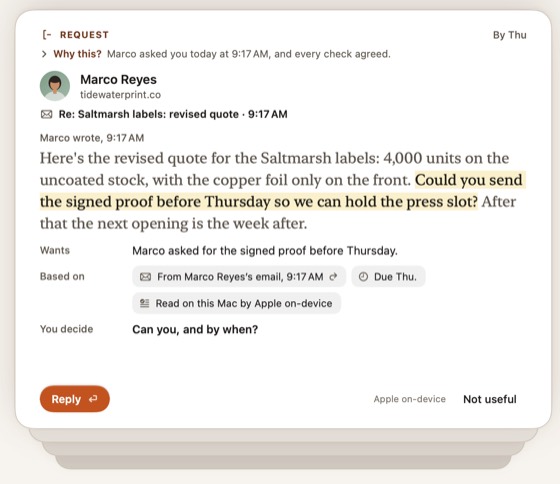
When someone asks you for something, MarginMail highlights the exact sentence and marks the row in the margin. Every card says why it’s there. On a long thread, What’s been decided sums it up: what’s settled, what’s still open and who’s waiting on whom.
What’s been decidedSaltmarsh labels · 14 messages
- Decided
- Copper foil on the front only. 4,000 units on the uncoated stock.
- Still open
- Which press slot, if the proof is late.
- Waiting on
- You, for the signed proof by Thursday.
Private AI email replies you send yourself
A draft from your notes. Sent by you.
Jot a few notes and press Write it. MarginMail drafts the reply from your notes and the thread, right in front of you, and flags anything it added that the thread didn’t have. You read it. You send it.
Write it uses your own Claude, signed in on this Mac, only when you click. Only that conversation goes to Anthropic, under your plan. Request notes use Apple Intelligence, on-device. MarginMail works fully with AI off.
Reply
Write itWriting…Written
To
MRMarco Reyes
Tidewater Print
Subject
Re: Revised quote, spring catalog
Claude is reading 4 messages…Claude is writing…
Stop
Written by Claude on this Mac. Read it before you send.
#Number not in the thread$2,450
Hi Marco,
Thanks for the revised quote. The 2,500-copy run on the uncoated stock looks right, and we’d approve the revised total of $2,450 if the press slot still holds.
I’ll send the signed proof back by Thursday so you can keep the slot.
Thanks,
Nora
AI never sends. You do.
Send ⌘↩
The details
In-window composer.
Docked, floating anywhere or expanded over the reader. Your inbox never disappears.
Done, not Archive.
Handled mail leaves. That’s the whole idea.
Multiple Gmail accounts.
Several Google accounts, one unified inbox. Plus Dock badge, signatures and View › Zoom.
Your day in the menu bar.
Today’s agenda one click away, with Join for the next call.
Notifications for what needs you.
Per account: everything, only what needs you and your VIPs, or nothing. Quiet hours and Focus filters too.
Private email: no servers, no tracking
Made for the Mac. Made for privacy.
MarginMail is a native Mac app, built from the start to keep your mail yours. There’s no MarginMail server in the middle: we can’t read your mail, and we can’t see how you use the app.
No usage tracking.
No analytics or telemetry in the app, so we can’t see how you use it. This site sets no cookies and doesn’t track you: we count visits anonymously on our own server, with no ads or third parties, and we honor Do Not Track.
Tracking pixels blocked.
Remote images are blocked by default. Load them for one message, or always for a sender you trust. Hidden 1×1 tracking pixels are stripped even when you load images, and the images MarginMail does load are fetched without cookies or referrer.
No read receipts.
MarginMail never adds read receipts or open tracking to the mail you send.
No MarginMail server.
Your mail goes between your Mac and Google, and nowhere else.
AI that stays with you.
Apple Intelligence on your Mac first. Your own Claude only if you opt in, and only when you click. AI never sends.
Your data, your account.
MarginMail’s own data lives in your Google account’s private app folder.
Inbox zero, with a sunrise
Done feels good here.
Clear the stack and MarginMail shows a calm scene for a moment: a sunrise over the horizon, still water, a beam of light, chosen by the time of day. Small things like that are on purpose.
Come try it early.
MarginMail is in beta for Mac with Gmail and Google Workspace accounts. We’re letting people in a few at a time so we can listen closely.
FAQ
Questions
What is MarginMail?
MarginMail is a native Mac email app for Gmail and Google Workspace, with a calendar and a personal CRM built in. It notes what needs you, helps you find meeting times as you type, and gives everyone you write to a page. Its optional AI uses Apple Intelligence on your Mac or your own Claude, and never sends email.
Is there a native Gmail app for Mac?
Google doesn’t make a Gmail app for the Mac; Gmail runs in a browser. MarginMail is a native macOS app built on the Gmail API, so your Gmail and Google Workspace accounts get real Mac windows, notifications and keyboard shortcuts, with your calendar and the people you write to in the same window.
Does MarginMail store my emails on its servers?
No. There is no MarginMail server for your mail. MarginMail connects directly to Google from your Mac, so your messages stay with you and Google. MarginMail’s own small settings live in your Google Drive’s hidden app folder. There are no analytics in the app, so we can’t see how you use it.
Does MarginMail have a built-in personal CRM?
Yes. Everyone you write to gets a page built from your mail and calendar: past conversations, meetings, notes, tasks and their local time, grouped by company. Tasks close themselves when the reply or file arrives. It stays in your own Google account. Nothing is uploaded to a CRM service, and there’s nothing to import.
Is MarginMail’s AI private?
Yes. Request notes use Apple Intelligence on your Mac, so nothing leaves it. If you choose, Write it and What’s been decided use your own Claude, signed in on your Mac, only when you click. Only that one conversation goes to Anthropic, under your own plan. MarginMail never sees your Claude login, uses no API key, and runs no AI server.
Can I use MarginMail without AI?
Yes. MarginMail works fully with AI off. Follow-up and meeting notes, live words, the calendar, Find a time, People and Companies all run on plain rules. Turning AI on adds Request notes, which are found on your Mac, and Write it, which drafts replies with your own Claude.
Can MarginMail’s AI send emails for me?
No, never. MarginMail’s AI can draft a reply, but only you can send it. Before you do, MarginMail flags anything the draft added that the thread didn’t have, such as a new recipient, a link, a number or a code, and labels which AI wrote it.
Does MarginMail work with multiple Gmail accounts?
Yes. You can add several Gmail and Google Workspace accounts and see them in one unified inbox, with your calendars together beside it. MarginMail supports Google accounts today. iCloud and other providers are planned for later, and MarginMail will say so clearly when they arrive.
Does MarginMail have a calendar?
Yes. Your Google Calendar sits beside your inbox. Invitations you haven’t answered look different and gather in a Needs your answer list. Press A, M or D to accept, maybe or decline, and the invite’s email files itself. Find a time shows both calendars side by side when Google shares theirs with you, and places the hold.
Can I see my email and calendar in one window on Mac?
Yes. MarginMail’s Split view shows your inbox, the message and today’s calendar side by side. Click a name to see that person’s page. Answer invites with A, M or D, and their email files itself. It works with several Google accounts and calendars at once.
How do follow-up reminders work in MarginMail?
When you’re waiting on a reply, MarginMail notices and writes a note in the reply bar, like “You asked Ava on Oct 9. No reply in 6 days.” The note joins your Margins stack so you can nudge, mark it Done or move it to Later. It works on rules, with AI off.
Does MarginMail use read receipts or tracking pixels?
No. MarginMail never adds read receipts or open tracking to the mail you send. It also blocks remote images in mail you receive by default, so senders’ tracking pixels don’t load unless you allow images for that sender.
How much does MarginMail cost?
MarginMail is free during the beta. Pricing will be announced before the beta ends, well before anything changes for you. Joining the beta only needs your email address, and the only email we’ll send is your invite.
Is there a MarginMail app for iPhone?
Not yet. MarginMail starts on the Mac, where your mail, calendar and people share one window. An iPhone companion app is planned for later. Until then, your mail stays in Gmail as usual, so you can keep using Gmail on your phone.
Is MarginMail the same as the Margin app for iPhone?
No. MarginMail is our own Apple-native email app for the Mac, built for Gmail and Google Workspace, with an iPhone companion app planned for later. It isn’t affiliated with other apps named Margin. Everything about MarginMail is on marginmail.ai, and the beta is free to join.
What Mac do I need for MarginMail?
MarginMail needs macOS 26 or later. Request notes use Apple Intelligence, so they need a Mac where Apple Intelligence is available and turned on. Everything else, including the calendar, follow-up notes, live words and People, works without it.
When can I join the MarginMail beta?
Join the list on this page and we’ll email you when your invite is ready. We’re letting people in a few at a time so we can listen closely to each wave. Your email address is all we ask for. This site sets no cookies and doesn’t track you; we only count visits anonymously on our own server.